Table of Contents
- Paid vs. Free Streaming Services: The Quick Difference
- 8 Best Free Streaming Services to Try in 2026
- What About Netflix, Disney+, Hulu, and Other Paid Apps?
- 3 Names on Older Streaming Lists That Need Updating
- How to Choose the Right Free App
- How to Spend Less on Streaming Without Missing Your Favorites
- Are Free Streaming Apps Safe and Legal?
- Frequently Asked Questions
- Sources and Official Streaming Links
Free streaming services can save you money when you want movies and TV shows without another monthly bill. Tubi, Pluto TV, Plex, and The Roku Channel offer legal, ad-supported entertainment, while Kanopy and Hoopla let eligible library members watch without a separate streaming subscription. The best choice depends on whether you prefer movies on demand, live channels, or specific shows available only on paid platforms.
- Best free on-demand starting point: Tubi
- Best for channel surfing: Pluto TV or Sling Freestream
- Best mix of movies and live TV: The Roku Channel or Plex
- Best library-card options: Kanopy or Hoopla
- Important: Free services often show ads and do not carry every title from paid apps

Paid vs. Free Streaming Services: The Quick Difference
Paid streaming services charge for access to their catalog, often including exclusive originals, new releases, or additional viewing features. Some paid plans still include commercials. Free streaming platforms usually earn money from advertisements instead of subscription fees. Library services work differently: your participating library covers access.
There is one important catch: Tubi is not a free version of Netflix, and Pluto TV is not a free version of Hulu. Each service has its own licensed content. You may find a great movie for free, but that does not mean the newest show from a subscription platform is available there.
| Feature | Paid subscriptions | Free streaming |
|---|---|---|
| Monthly payment | Usually required | No subscription for the free catalog |
| Ads | Depends on the plan | Common, except many library options |
| Exclusive originals | Often a major reason to subscribe | Limited and service-specific |
| Live TV | Depends on the service or add-on | Available on many free apps |
| Downloads | Available on certain plans | Often limited; library options may support them |
| Catalog | Changes with licensing | Also changes with licensing |
8 Best Free Streaming Services to Try in 2026
1. Tubi — For Free Movies and Shows on Demand
Tubi is a straightforward place to start when you want to choose a movie or series and press play. The service is free, with advertisements rather than a paid subscription. You can browse genres on many smart TVs, phones, and browsers. An account can help save your watchlist, but you do not need to enter a credit card just to watch the free catalog.
2. Pluto TV — For Watching TV Like Cable
Pluto TV offers scheduled live channels along with an on-demand section. It works well when you want to turn on a channel without deciding on a particular film. The trade-off is that live channels follow a schedule and include ads.
3. Plex — For Free Movies, Shows, and Live Channels
Plex has a free ad-supported library and live TV channels. It also includes tools for organizing personal media, which are separate from its free licensed streaming catalog. Be sure a title says it is free: some interfaces also surface rentals or availability on other services.
4. The Roku Channel — For a Mix of Free TV and Movies
The Roku Channel offers free movies, TV shows, Roku Originals, and live channels. In the U.S., you do not need to own a Roku streaming player to use its web or supported app experiences. Some additional subscription offers appear in the broader Roku interface, so stay within the free section when avoiding charges.
5. Xumo Play — For Easy Free Channel Surfing
Xumo Play provides free live channels as well as on-demand movies on supported devices. It does not require a paid plan or credit-card information for the free service. Try this if you like browsing news, entertainment, or themed channels.
6. Sling Freestream — For a Large Selection of Live Channels
Sling Freestream is the free, ad-supported side of Sling. It offers live channels and on-demand programming without requiring a paid Sling TV subscription. It is useful if you mostly want to browse what’s on rather than follow exclusive subscription series.
7. Kanopy — For Films Through Your Library
Kanopy is different from ad-supported apps. Participating public libraries and universities provide access to films, documentaries, independent cinema, and other collections without commercial breaks. You need an eligible library card or institution login. Available titles and viewing allowances depend on your institution.
8. Hoopla — For Movies and Other Library Borrowing
Hoopla allows people with a card from a participating library to borrow movies and TV alongside eBooks, audiobooks, and more. There is no personal subscription charge for eligible library users. Borrowing limits vary by library, so check what your local branch offers.
What About Netflix, Disney+, Hulu, and Other Paid Apps?
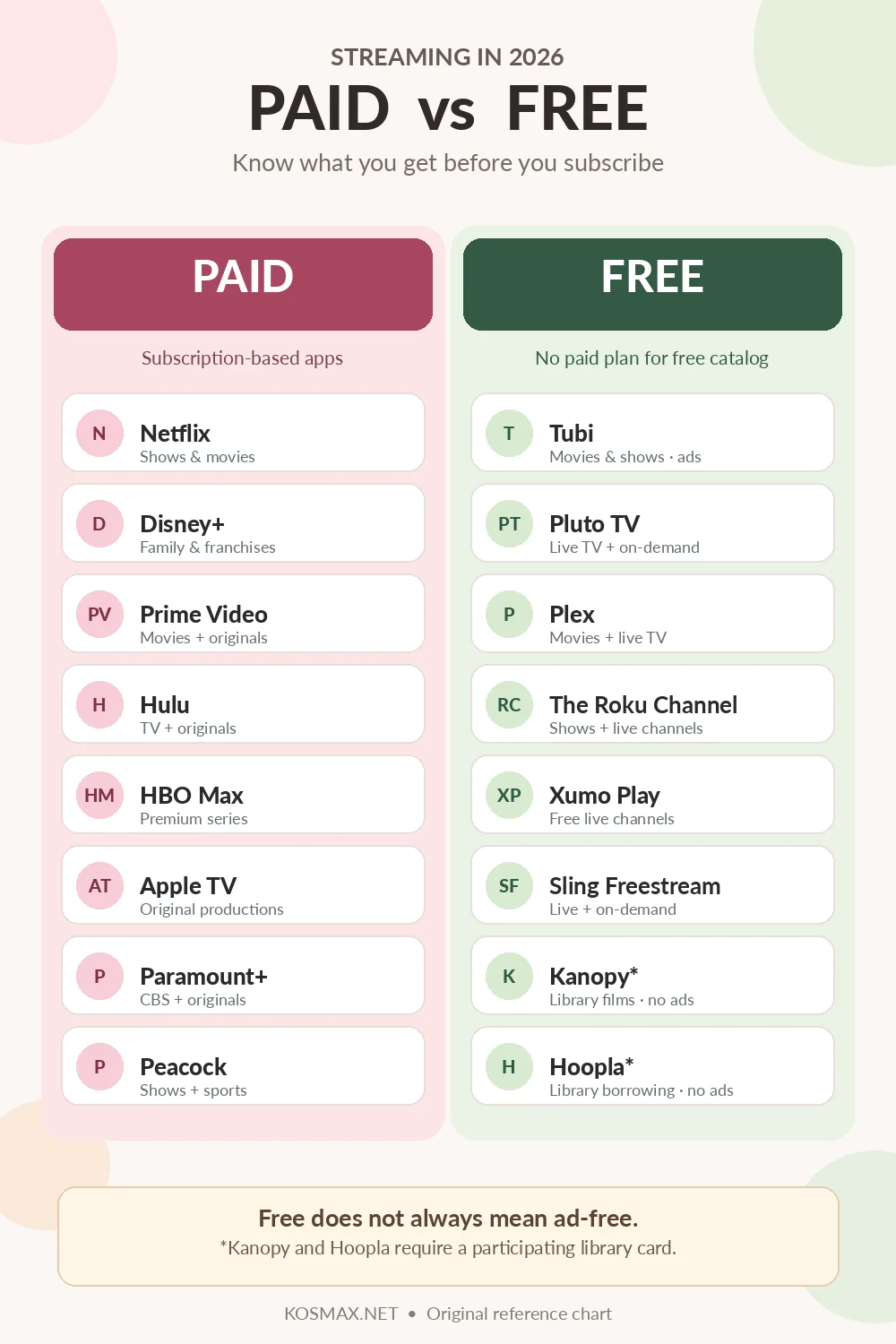
Paid services can still be worth the cost. The question is whether you regularly watch titles that are not included in the free catalogs.
- Netflix: A subscription service with different paid plans, including an ad-supported option in eligible markets.
- Disney+: Often chosen for Disney, Pixar, Marvel, Star Wars, and family-focused programming.
- Prime Video: Has paid subscription content as well as selected titles marked free with ads in eligible regions.
- Hulu: Known for TV series, originals, and available bundles or add-ons.
- HBO Max: A subscription choice for HBO series and Warner Bros.-related programming.
- Apple TV: Apple’s subscription streaming service, formerly branded Apple TV+.
- Paramount+: Carries selected Paramount, CBS, and original programming depending on plan and location.
- Peacock: Offers NBCUniversal-related programming, originals, and selected sports.
Remember: Paying does not always mean ad-free. Check the exact plan features before subscribing, especially if avoiding commercial breaks is important to you.
3 Names on Older Streaming Lists That Need Updating
Amazon Freevee
Freevee is no longer a separate app. Amazon moved its free-with-ads programming into Prime Video’s Watch for Free experience in supported markets. Look for the free label rather than assuming every Prime Video title requires Prime membership.
Crackle
Older lists still recommend Crackle, but Sony’s support notice states that the streaming service ended. It should not be presented as an active, reliable recommendation.
Max and Apple TV+
The service called Max returned to the name HBO Max. Meanwhile, Apple now uses Apple TV for its subscription streaming brand, previously called Apple TV+. These are name changes, not new free alternatives.
How to Choose the Right Free App
| If you want… | Start with… | Why |
|---|---|---|
| A movie to pick tonight | Tubi | Simple on-demand browsing |
| TV channels running all day | Pluto TV or Sling Freestream | Live channel guides |
| Live channels plus movies | Plex or The Roku Channel | Mix of viewing formats |
| Something on without signing up | Xumo Play | Free basic viewing on supported devices |
| Documentaries and indie films | Kanopy | Library-funded film collections |
| Movies plus eBooks and audiobooks | Hoopla | Borrow different media with a library card |
How to Spend Less on Streaming Without Missing Your Favorites
- Write down what you actually watch. Look at the last month, not the shows you plan to watch someday.
- Keep one paid subscription at a time. Rotate between services when a specific series is available instead of paying for several unused memberships.
- Check free catalogs before renting. A licensed free service may already have the older movie you want.
- Use your library card. See whether your library participates in Kanopy or Hoopla.
- Check a show’s availability before canceling. Free catalogs change, and exclusive originals often remain behind a paid plan.
- Cancel through the original billing provider. A subscription purchased through an app store, Roku, or another bundle may need to be canceled there.
Are Free Streaming Apps Safe and Legal?
The legitimate services listed here license their programs or provide access through authorized library partnerships. You do not need to visit unauthorized streaming mirrors to watch legally for free. Download apps from official stores or visit the service’s own website, not an unfamiliar APK or a page demanding credit-card details for an allegedly free app.
Also check your region. This guide focuses on the United States. Some services or titles are unavailable elsewhere, and free viewing still uses your internet data. Families should check individual program ratings and parental controls because a free app can carry both children’s shows and adult programming.
Frequently Asked Questions
Is there a truly free alternative to Netflix?
Tubi, Pluto TV, Plex, and The Roku Channel offer free movies or shows, but they do not duplicate Netflix’s entire catalog or exclusive originals. Free means no paid subscription for the selected free programming, not identical content.
Can I watch free movies without a credit card?
Yes. Several ad-supported services, including Tubi, Pluto TV, and Xumo Play, offer free viewing without requiring credit-card details. Some optional account features or paid rentals elsewhere in an app may work differently.
Which free streaming services have no ads?
Kanopy and Hoopla are useful choices for people with access through participating libraries. Their library-funded viewing does not follow the same commercial-ad model as free services such as Tubi or Pluto TV.
Is Amazon Freevee still available?
Not as a separate streaming app. Amazon moved its free-with-ads catalog into Prime Video’s free viewing experience in supported markets.
Can I watch live TV for free?
Yes. Pluto TV, Sling Freestream, Plex, Xumo Play, and The Roku Channel provide free live channels, though schedules and selections vary.
Do free services work outside the United States?
Some do, but licenses, available channels, apps, and device support differ by country. Check the service’s current availability page for your location.
Sources and Official Streaming Links
This guide uses current information from Tubi, Pluto TV, Plex, Roku, Xumo, Sling, Kanopy, and Hoopla. Changes to older services were checked using Sony’s Crackle notice, Warner Bros. Discovery, and Amazon’s published support guidance.
Last reviewed: November 12, 2026. Service names, availability, prices, and libraries can change.